What Is Project Portfolio Management (PPM)?
Project Portfolio Management (PPM) is the centralized management of an organization’s projects and programs as a portfolio to ensure they collectively support strategic objectives. PPM uses a structured approach for selecting, prioritizing, governing, and monitoring projects and programs based on business value, risk, resource capacity, and strategic alignment.
Why Do Organizations Use Project Portfolio Management
Organizations engage in PPM not only to ensure that they are doing their projects right, but also to verify that they are doing the right projects. PPM ensures that projects are aligned with business strategy and directly support organizational goals. It is used to prioritize investments by funding and executing the most valuable initiatives. PPM also guides resource allocation balancing people, budget, and time across the portfolio. Risks and dependencies are made visible. Top-level decision-making is informed by clear visibility and leaders are able to start, stop, or adjust projects as needed. In other words, PPM is the mechanism for ensuring that day-to-day work aligns with the organization’s best interests.
What are the Challenges of Jira PPM ?
Project/Program/Product owners in Jira struggle to manage multiple teams, spaces, initiatives and epics. They need to be able to plan, track progress and report across multiple spaces, but complex hierarchies and multiple data points make managing multiple projects at the same time extremely difficult. There is lots of data, but little clarity.
Ensuring that needed resources are available is also a challenge. Lack of visibility into who is available to take new work and who is already overloaded leads to delays, delivery crunches and team burnout. Managers may forgo lucrative opportunities because they do not know if sufficient resources are available to complete the work. Teams may not be operating at peak efficiency if members are assigned tasks that don’t align with their skills.
With data is spread across multiple projects and multiple levels of interdependent initiatives, tracking progress and reporting to leadership is time-consuming, messy and inaccurate. Inability to show progress may jeopardize customer relations. Failure to identify risks can cause delayed deliveries and loss of revenue.
Why Do Jira PPM ?
Getting the Big Picture of your Jira Structure
One of the most important functions of Jira PPM is to provide visibility into the Jira structure. Program managers may be juggling multiple teams and spaces, making tracking progress on particular initiatives and epics challenging.
Jira’s basic structure is a three-level hierarchy with parent items (formerly known as epics) at the top, standard work items such as stories and tasks in the middle, and subtasks at the bottom. Jira makes it easy to view overall progress and navigate between parent and child items.
Organizations that use Jira Premium or Enterprise have an additional upper level grouping called Initiatives, as well as the ability to create custom work type hierarchies. Custom high-level hierarchies can be helpful when trying to get a broad view of the organization’s current work, timelines, etc. However, adding levels to the hierarchy also makes your Jira structure more complex.
Effective Jira PPM means both being able to see across multiple spaces and teams in one view, and being able to instantly drill down to tasks and subtasks or navigate to up to the top level parent items to make needed changes.
Jira Capacity Planning
Project portfolio management in Jira also empowers you to get the most out of available resources – including optimizing for your teams' capacity. Mastering Jira capacity planning allows you to make better estimations, ensure on-time deliveries, and anticipate and mitigate risk.
Atlassian offers a few capacity planning tools. There’s a Confluence Capacity Planning Template, the Jira User Workload Report, and team capacity tracking in Jira Plans. Those tools are limited though. The Confluence template has to be manually completed based on users' estimates of how they spend their time. The User Workload Report displays the assigned items and their estimated time for one user at a time, and the capacity planning function in Jira Plans addresses team capacity but can’t be broken down to show the capacity of individual users.
A Jira capacity planning tool should make it easy to see when team members are available for new work and when they are overbooked. The capacity planner should account for working hours, holidays and scheduled time off. Ideally, the Jira capacity planner would allow you to address forecasted demand by searching for users who have both the availability and the needed skills for upcoming tasks.
High-level Jira Reporting
Jira ships with an array of built-in reports. These reports are generated on the project level and most of them focus on agile development. While these reports are very useful at the project level, they do not include the multi-project, high-level data needed for PPM.
To create a report that spans multiple Jira spaces, you’ll need to combine JQL and a dashboard gadget, use Jira Plans (included at the Premium and Enterprise level), or source a solution from the Atlassian Marketplace.
Creating a Multi-Project Report with JQL
Creating a report that draws from more than one Jira space requires a few steps:
1. Write a JQL expression that returns the work items you want to include.
2.Save the query as a filter.
3. Navigate to your Jira dashboard and select a reporting gadget. (Searching for “Chart” surfaces several options).
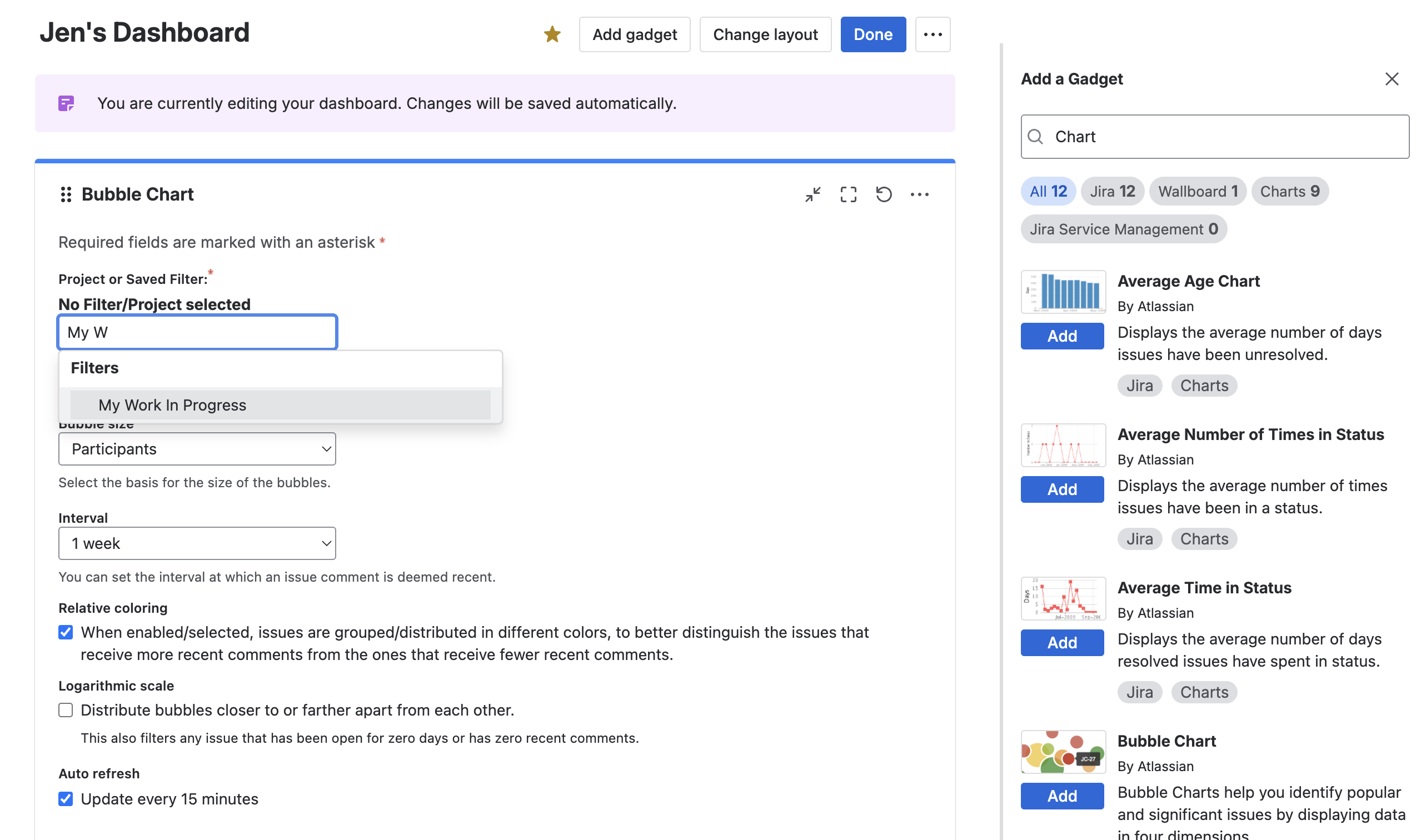
4. Configure the gadget to draw data from the saved filter.
Creating a Multi-Project Report with Jira Plans
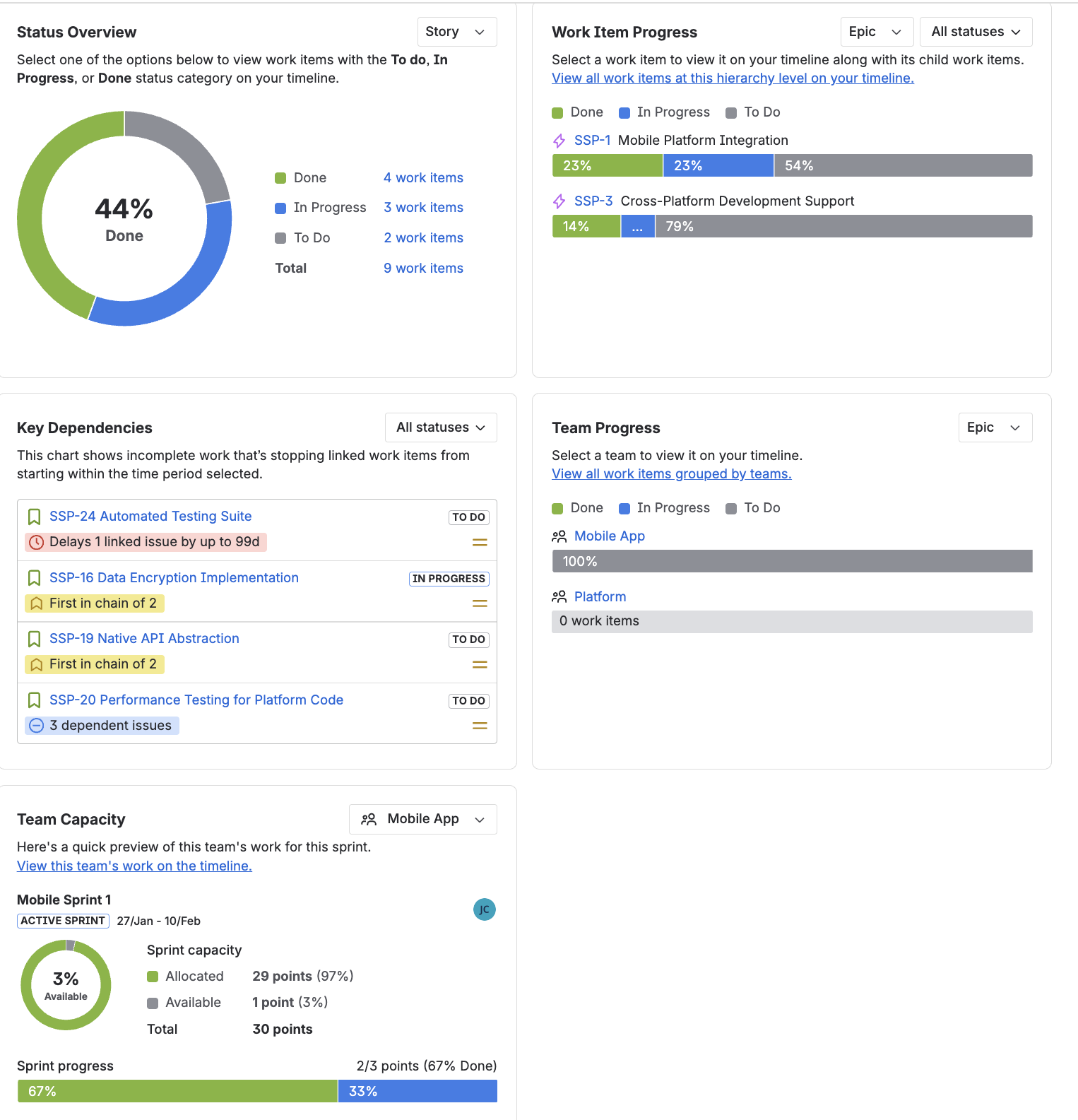
If you have access to Jira Plans (more on this below), you can create a multi-space plan. The Summary tab provides an overview of the status, work in progress, key dependencies, team capacity and team progress – good information for generating a status report to higher-ups.
Other views (timeline, program board, etc.) can also be shared.
Marketplace Reporting Apps
If you use the Standard version of Jira and need multi-space reports , you can save a little legwork by using a Marketplace app. Many Jira reporting apps integrate directly with Jira dashboards and may also allow you to export data to other BI tools. Some reporting apps, such as eazyBI Reports and Charts for Jira also allow you to combine data from Jira with data from other sources.
If your portfolio is completely handled in Jira, then you may also find the reporting capacity you need via shared views in your PPM solution. Look for a PPM solution that provides cross-project reporting, visibility into your Jira hierarchy (including custom hierarchies), and multiple, shareable views. Portfolio by HeroCoders allows you to share views and download your portfolio to a CSV file for further analysis, formatting or sharing outside of Jira.
Options for Jira Project Portfolio Management
You have a couple of options for PPM in Jira depending on whether you use the Free, Standard, Premium or Enterprise version.
Jira Advanced Roadmaps / Plans
At the Premium and Enterprise levels, Plans (formerly known as Jira Advanced Roadmaps) allows you to visualize and manage work across multiple spaces and teams. You can create multi-team program boards with customizable cards, drag and drop work items, track dependencies, manage releases and view team capacity. Jira Plans includes a Gantt view and supports scenario planning with changes made in a sandbox until they are confirmed.
See the Jira Plans video tutorials here for a quick overview.
Limitations of Jira Advanced Roadmaps / Plans
While Jira Plans is a viable option for conducting PPM in Jira, it has two significant limitations. First, it is only available in the Premium and Enterprise Jira tiers. Upgrading to Premium may be cost prohibitive, as well as unnecessary, for many small-to-medium organizations.
Secondly, the capacity planner in Jira Plans is currently a bit undercooked. You can only track and search capacity at a team level with no mechanism for tracking the availability of individual users. There’s no skills matching, and no warnings when a user is overbooked.
Project Portfolio Management Tools from the Atlassian Marketplace
If your team is on the Standard Jira tier, or if you’re looking for more features than what’s natively available in Jira, the Atlassian Marketplace has lots of PPM offerings. Look for a Marketplace app that fulfills all three PPM use cases:
- Planning & Visibility – Visualize your most complex programs, portfolios, and products in a single view. Format views as a Gantt chart for timeline planning, a graph to see proportionality or a spreadsheet to take advantage of inline editing.
- Capacity Planning – See who is available to take on the work and who is overloaded. Know when deliveries are at risk and easily find the right team member to deliver the work on time.
- Reporting – Share real-time insights into project statuses, and resource allocation, enabling proactive management and informed decision-making.
Choosing a Project Portfolio Management Tool from the Atlassian Marketplace
Once you’ve identified possible PPM apps from the Marketplace, put them through the vetting questions you (hopefully) use for all of your candidate Jira apps:
- Is the app an all-in-one solution or does it require purchasing separate modules to provide the full functionality you’re looking for?
- Is the app fully-integrated with Jira?
- Is it within your organization’s budget?
- Can you get onboarded straight away or is there a steep learning curve?
- Does the app have the appropriate trust signals such as SOC2 compliance and the Runs on Atlassian badge?
- Is the app backed by good support as indicated by its Marketplace reviews?
Project Portfolio Management is essential for organizations that want to ensure their Jira investments are driving the right outcomes, not just delivering work. By gaining visibility across projects, optimizing capacity, and enabling high-level reporting, effective Jira PPM helps leaders make informed decisions, manage risk, and align day-to-day execution with strategic goals. Whether through Jira Plans or a Marketplace solution, the right PPM approach allows teams to move beyond isolated projects and manage their work as a cohesive, outcome-focused portfolio.