Capacity planning sounds straightforward until a team has more work than it can realistically deliver.
A portfolio manager may have a clear list of projects. Team leads may know who is available. Jira may contain estimates, priorities, deadlines, and statuses. Yet when all of that information needs to come together, a familiar question appears: Can we actually deliver everything we have committed to?
That is where capacity planning becomes more than a scheduling exercise.
Effective capacity planning connects three things that are often managed separately: demand, available capacity, and delivery expectations. The challenge is that these variables change continuously. A new project is added, an important initiative moves forward, someone takes leave, an estimate changes, or a dependency slips. A plan that looked healthy on Monday can become overloaded by Friday.
Jira provides the foundation for managing this work, but teams managing multiple projects often need a portfolio-level view to turn individual work items into meaningful capacity decisions. This is also where AI can add another layer of value, helping teams interpret the signals in their Jira data rather than simply displaying them.
Try Portfolio by HeroCoders for Free Now.
Why capacity planning gets difficult in Jira
Jira is designed to manage work at a detailed level. Teams can track work items, sprints, estimates, priorities, assignees, and workflow states. Jira Plans also provides capacity planning capabilities for teams, giving organizations a way to compare planned work with team capacity as part of their planning process.
The difficulty appears when the question moves from "What is happening with this work item?" to "What does all of our work mean for the next three months?" At this level, capacity planning often needs to account for more than team-level availability. Working hours, public holidays, planned absences, and the precise timing of individual assignments can all affect whether a plan is realistically achievable.
Consider a team of 12 people working across several initiatives. At the work item level, every project may look reasonable. Each ticket has an owner, estimates appear manageable, and individual sprint commitments are being tracked.
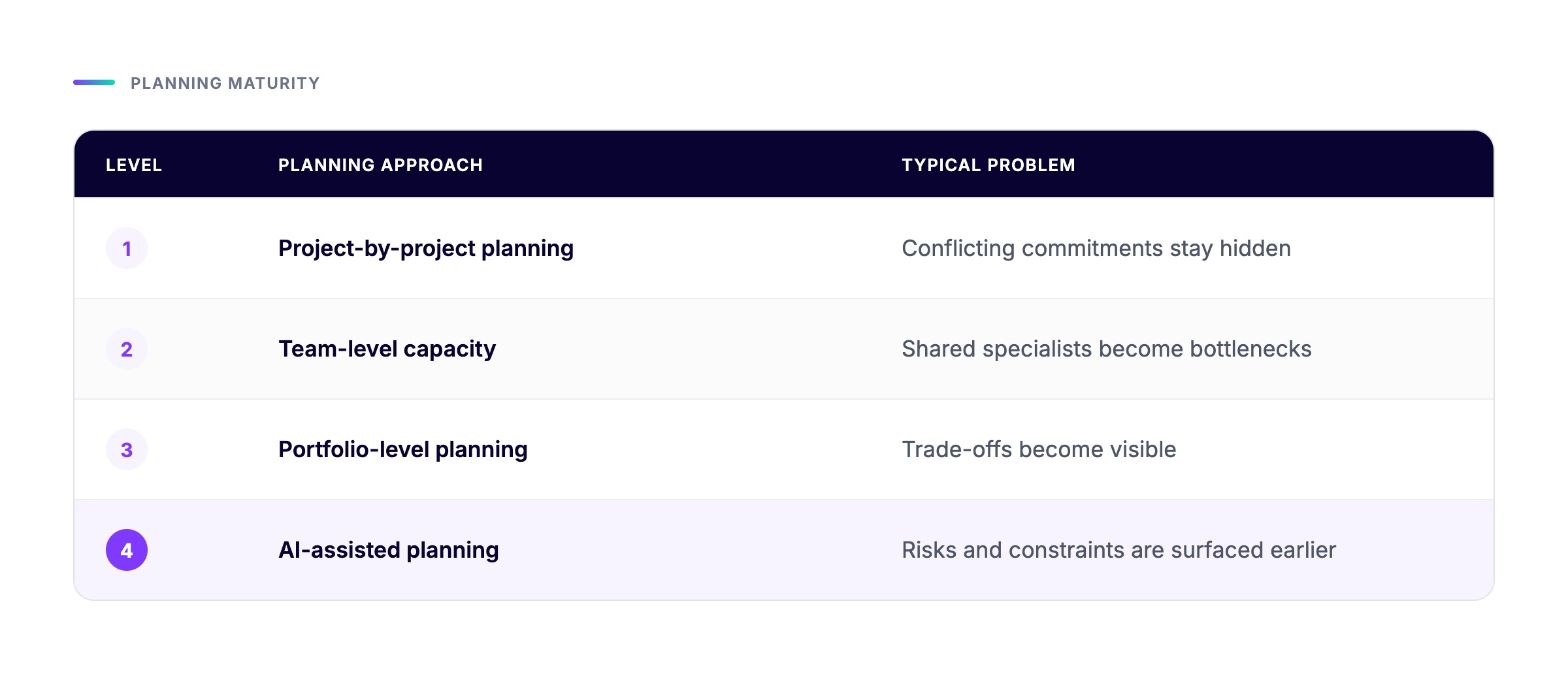
At the portfolio level, however, five projects may depend on the same three specialists.
The problem is not necessarily visible from any individual Jira board, and a team-level capacity view may not provide enough detail to understand exactly when and where capacity becomes constrained.
This creates several common gaps:
Capacity is distributed across projects
A person can be assigned to multiple initiatives without anyone having a simple view of their total planned workload.
Looking at each project independently can therefore create a false sense of available capacity. Even when team-level capacity is visible, shared specialists can still become bottlenecks when several projects compete for the same people during the same period.
Planned demand is separated from actual availability
Capacity is not simply the number of people on a team.
A team member may have annual leave, public holidays, part-time availability, operational responsibilities, or commitments to another project. A team with 100 theoretical hours available may have significantly less practical capacity.
Dependencies distort otherwise reasonable plans
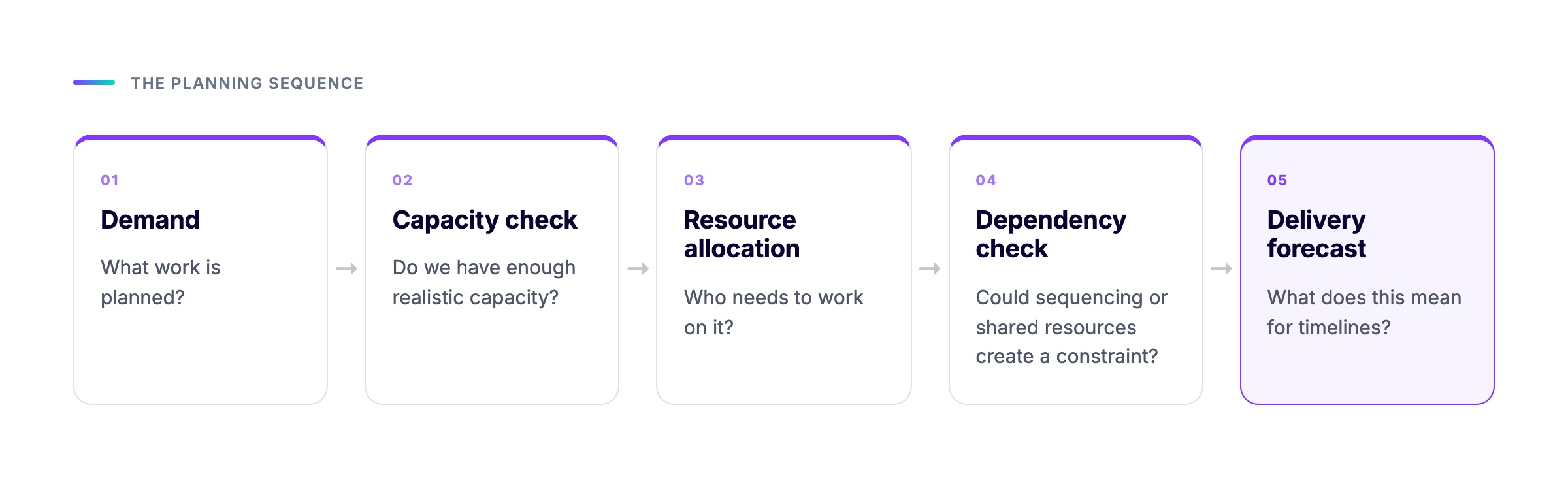
Project A may be on schedule until you discover that Project B must finish first.
Similarly, a specialist may have enough hours available overall but not enough availability during the specific period when another project needs them. A capacity plan that looks balanced in aggregate can therefore become overloaded when dependencies and timing are taken into account.
Risks are often discovered after they become visible
Traditional reporting tends to answer questions about the current state: what is late, what is blocked, and what has been completed.
Capacity planning needs to answer a slightly different question:
What is likely to become a problem next?
That distinction is important.
Capacity planning is a balancing problem
A useful way to think about capacity planning is as a relationship between demand, capacity, and time.
At its simplest:
Available capacity = working time - planned absence - existing commitments
Then compare that available capacity with planned demand.
For example, imagine a team member has 160 working hours available over a planning period. After holidays and operational responsibilities, 125 hours are realistically available for project work.
The portfolio currently assigns:
- Project A: 45 hours
- Project B: 35 hours
- Project C: 30 hours
- Project D: 25 hours
Total demand is 135 hours.
On paper, the difference is only 10 hours. But that does not necessarily mean the person is only slightly over capacity.
If Project A requires the person heavily during the first two weeks and Project C requires them later, the timing matters. Capacity is not a single number. It is capacity over time.
This is why effective Jira capacity planning should consider at least four dimensions:
- Who is needed?
- How much work is required?
- When is the capacity required?
- What dependencies or constraints could change the plan?
A portfolio view makes these relationships much easier to reason about.
A practical Jira capacity planning workflow
A useful capacity planning process does not need to become a complicated forecasting exercise. A strong starting point is to build a repeatable planning cycle.
Step 1: Define the portfolio scope
Start by deciding what work should be included.
This could be all active projects, a collection of strategic initiatives, or work selected through Jira filters and JQL.
The important point is consistency. If the portfolio view changes every time someone runs a planning meeting, capacity comparisons become unreliable.
Portfolio by HeroCoders supports portfolio scopes that can be defined manually or through JQL, making it possible to build views around a specific set of Jira work.
Step 2: Establish realistic capacity
Next, define when people and teams are actually available.
This means accounting for working days, holidays, leave, and existing assignments rather than treating every person as available for 100% of their working time.
Portfolio by HeroCoders provides capacity views at the user, team, project and role level and supports holiday calendars and personal leave, allowing planned availability to be reflected in capacity calculations.
The goal is not to maximize utilization.
In fact, planning every available hour is usually a warning sign.
A small amount of spare capacity provides room for operational work, unexpected issues, support requests, and changes in priority. A plan that requires 100% utilization to succeed is already fragile.
Step 3: Map demand against capacity
Once availability is established, compare it with planned work.
This is where a portfolio-level capacity view becomes particularly useful.
Instead of opening multiple boards and manually calculating allocations, teams can look at workload across projects and identify where demand exceeds availability.
This is also where resource requests can help bridge the gap between planned demand and confirmed assignments. Portfolio by HeroCoders allows teams to create resource requests for future work, specifying the estimated time, start and end dates, and, where needed, the roles and skills required. This makes it possible to identify the type of resource a project will need before assigning a specific person.
When the request is ready to be confirmed, Portfolio can show available users with the required roles or skills, helping teams move from identifying a resource need to making an appropriate assignment.
Portfolio by HeroCoders provides real-time team workload visibility across projects, including capacity views by day, week, and month.
The key is to look for patterns rather than isolated numbers.
For example:
- One person consistently over capacity for six weeks
- A specialist with a large spike in demand during a critical milestone
- Several projects competing for the same role
- A team with unused capacity while another team is overloaded
- Work that has been planned but has no realistic resource allocation
These are planning signals, not simply reporting metrics.
Step 4: Test the plan against dependencies
Capacity and dependencies should be evaluated together.
Suppose Project A requires a specialist for 40 hours. The person has 40 hours available, so the allocation appears valid.
However, Project A cannot start until Project B delivers an integration component. If Project B slips by two weeks, the specialist's capacity may suddenly become available earlier than expected, while the downstream milestone moves later.
This is why Gantt views and dependency information are useful alongside capacity data.
Portfolio's Advanced edition includes Gantt planning with dependencies and lag times, allowing teams to examine schedule relationships alongside resource planning.
See how Portfolio stacks up against the competition.
Where AI changes the capacity planning conversation
Dashboards are good at showing information.
AI can help teams interrogate that information.
This distinction matters because portfolio managers rarely struggle with having no data. More often, they struggle with having too much of it.
A portfolio containing hundreds or thousands of Jira work items may contain enough information to identify a developing problem, but finding that signal manually can require repeated filtering, sorting, and cross-checking.
An AI assistant can provide a more natural way to explore those relationships. For capacity planning in particular, it can help answer questions about resource availability, allocations, and whether the right skills are available for planned work.
For example, instead of manually reviewing every project, a portfolio manager could ask questions such as:
- Which developers with the required skills are available to work on this task?
- Do we have someone with the right skills available to deliver this work within the required timeframe?
- Which team members currently have available capacity for this assignment?
- Where are resources currently over-allocated across projects?
- Which people or teams have competing allocations during a specific period?
- Where do we have available capacity that could be used for planned work?
The agent can also help investigate delivery risks in the context of individual work items, rather than assessing risk across the entire portfolio.
The value is not that AI magically predicts the future.
The value is that it can help surface relevant capacity and resource signals faster.
Portfolio Insights: turning portfolio data into questions you can act on
Portfolio by HeroCoders includes the Portfolio Insights Rovo agent, designed to help users ask risk, capacity, and portfolio-related questions using their Jira data. HeroCoders describes the agent as a way to surface risks, bottlenecks, and progress signals across the portfolio and turn them into actionable answers.
This creates a useful workflow:
Portfolio data → AI-assisted analysis → human decision → updated plan
The human decision remains important.
If an AI insight indicates that a team is potentially overloaded, the next step is not automatically to move work around. The portfolio manager should investigate why the allocation exists and whether the underlying assumptions are still valid.
Perhaps the project is genuinely high priority.
Perhaps an estimate is outdated.
Perhaps another team member has recently become available.
Perhaps the dependency causing the apparent bottleneck has already been resolved.
AI is most useful here as an early-warning and investigation layer, not as a replacement for portfolio judgment.
A better way to use AI insights
There is a temptation to ask an AI agent broad questions such as "Is my portfolio healthy?"
That may be useful as a starting point, but more specific questions usually lead to more actionable analysis.
A better approach is to progressively narrow the investigation.
Start broad
"Which areas of my portfolio currently show the highest delivery risk?"
Investigate the cause
"What capacity or dependency factors are contributing to those risks?"
Identify the constraint
"Which people or teams appear to be the most constrained?"
Explore the impact
"Which projects could be affected if that capacity remains constrained?"
Decide on an action
"What options should we consider to reduce the risk?"
This approach turns AI from a reporting shortcut into a decision-support tool.
It also creates a useful separation between signal detection and decision making.
The AI helps find the signal. The portfolio manager provides the context and decides what should happen next.
From over-allocation to portfolio-level decisions
Imagine a realistic scenario where three projects are planned for the same quarter.
Project A is a high-priority customer initiative.
Project B is an internal modernization effort.
Project C is a strategic feature initiative.
All three require the same specialist.
Individually, each project has a reasonable schedule. Collectively, the specialist is over-allocated.
A traditional project review might discover the problem when Project B starts missing milestones.
A capacity planning view can expose the conflict earlier.
An AI insight layer can take the analysis one step further by helping identify the affected projects, timing, and potential delivery risks that deserve attention.
The resulting decision could be:
- Move Project C to a later period
- Reassign part of Project B
- Request additional capacity
- Reduce the scope of one initiative
- Change sequencing between projects
- Accept the risk consciously because Project A has higher strategic priority
Notice that capacity planning does not tell the organization which project should win.
It makes the trade-off visible.
That is one of the most valuable outcomes of portfolio management.
Why visibility should come before automation
Teams sometimes approach capacity planning with the goal of automating resource allocation immediately.
A better progression is:
Visibility → analysis → decision → adjustment → monitoring
First, establish a reliable picture of the portfolio.
Then identify constraints.
Then decide how to respond.
Only after that should teams consider more sophisticated automation or forecasting.
Portfolio by HeroCoders supports this model by combining portfolio planning, customizable views, capacity planning, workload visibility, resource requests, and risk-oriented insights in Jira. Its views can also include Jira fields and Portfolio fields, allowing teams to keep relevant planning information together instead of maintaining separate spreadsheets.
The result is not simply another dashboard. It is a planning environment where portfolio structure, capacity, dependencies, and delivery signals can be considered together.
The real objective of capacity planning
The ultimate goal of capacity planning is not to make every person fully utilized.
It is not even possible to produce a perfect forecast.
The goal is to make better decisions before constraints become delivery problems.
A mature Jira capacity planning process should help answer five questions continuously:
- Do we have enough capacity for the demand we have accepted?
- Where are the biggest constraints?
- When will those constraints affect delivery?
- What risks are emerging that are not yet visible in project status reports?
- What trade-offs can we make while there is still time to act?
Jira provides the underlying work data. Portfolio-level planning brings that data into a structure where demand and capacity can be compared. AI can then make the growing volume of portfolio information easier to investigate.
That combination is particularly useful for organizations where the number of projects, dependencies, and shared resources has grown beyond what individual Jira boards can comfortably represent.
Final thoughts
Capacity planning is ultimately about making constraints visible.
The earlier a team can see that demand is exceeding available capacity, that several initiatives depend on the same specialist, or that a schedule is becoming increasingly fragile, the more options it has.
Jira provides the foundation for tracking the work. A portfolio and capacity planning layer such as Portfolio by HeroCoders can connect that work across projects and teams, while Portfolio Insights adds an AI-assisted way to investigate risks, bottlenecks, and capacity questions.
The important shift is from asking "What is the status of our projects?" to ask "Given our current capacity and demand, what is most likely to happen next, and what can we do about it now?"
That is where capacity planning becomes a strategic capability rather than another reporting exercise.
And increasingly, AI can help teams make that shift with less manual analysis and more time spent on the decisions that actually matter.
About the Author:

Anahit Sukiasyan is an Atlassian Certified Professional and Community Champion, recognized for her dedication to fostering collaboration, innovation, and knowledge-sharing within the global Atlassian ecosystem. With a strong background in IT Service Management, she has extensive hands-on experience with Jira, Jira Service Management, Confluence, Trello, and Jira Product Discovery, working across both Cloud and Data Center environments. Anahit specializes in end-to-end Jira project configuration, tailoring workflows, automation, and reporting to align with diverse business needs and improve operational efficiency.
Beyond her technical skills, Anahit is deeply committed to building and nurturing communities. Being an organizer of the Atlassian Community in Yerevan, she actively connects professionals, facilitates learning opportunities, and empowers users to get the most out of Atlassian tools.