

Global Checklists in Jira provide a scalable way to standardize processes across complex organizations.
Why Large Organizations Struggle With Standardization
Organizations rely on repeatable processes—security checks, QA gates, regulatory steps, onboarding routines. But as a company scales, these processes can fragment across hundreds of projects and teams.
Common challenges include:
- Gaps in QA or compliance because teams forget, or are not aware of, required steps
- Policy drift when each team maintains its own checklist with their interpretation of the requirements
- Outdated processes as changes are delayed in trickling down to all teams
Teams – even agile teams – in large organizations need clarity and consistency. A global definition of “done,” standard release steps, or required approval items cannot should be consistent, regardless of team or project. That’s where Global Checklists become essential.
What Are Global Checklists?
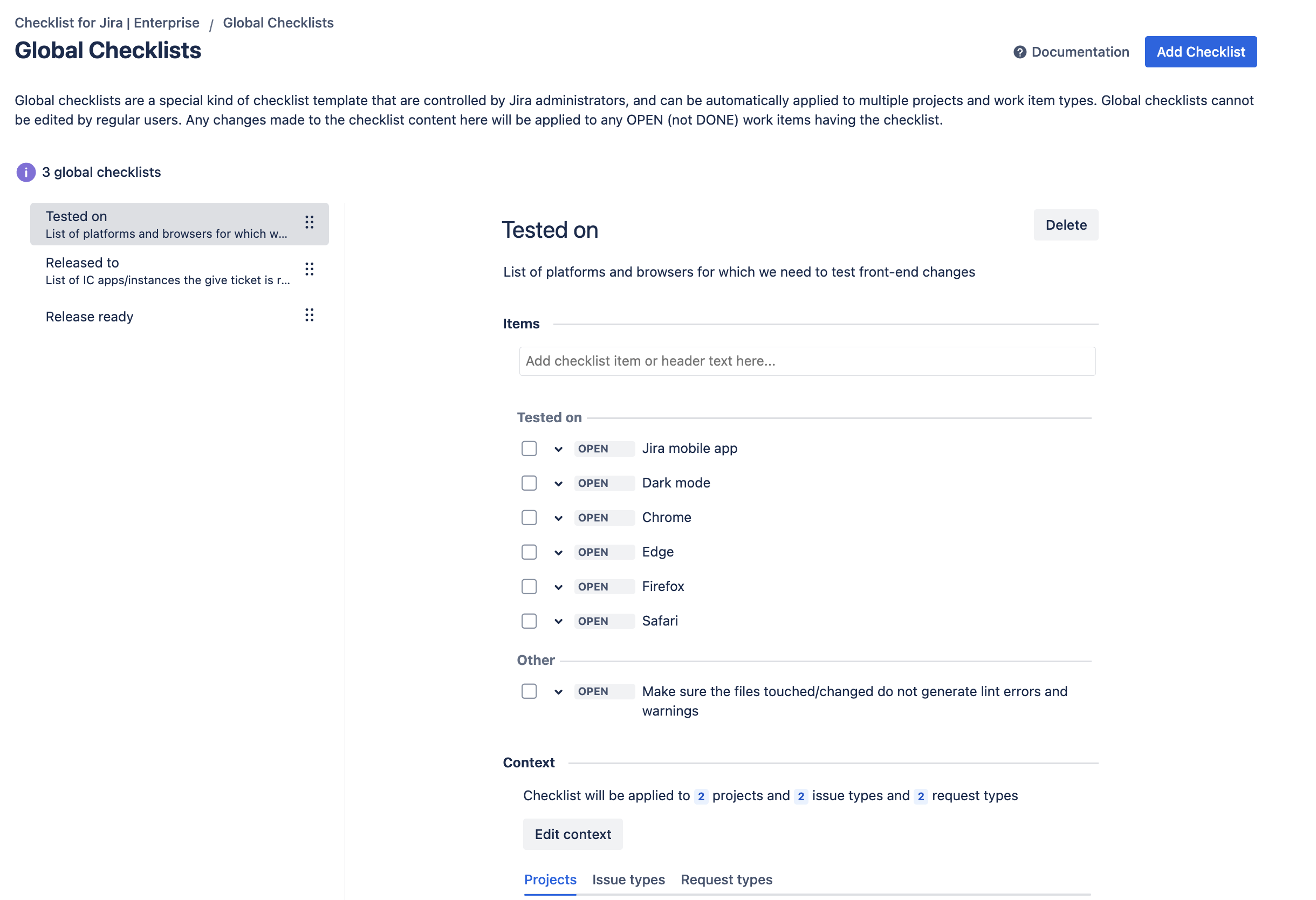
Global Checklists address those challenges by ensuring every team follows the same required steps—no matter where the work is happening. They differ from local checklists in that:
- They are managed by Jira admins. Other users can toggle the completion status of checklist item on a work item, but only an admin can create, modify or delete the checklist or its items.
- They are applied to Jira work items via a context which defines which Jira spaces and work types the checklist will be applied to.
- They are live. When an admin modifies the checklist, for example by adding a new requirement – that change is immediately to all open work items having the checklist.
This controlled model solves the long-standing enterprise problem of keeping procedures aligned across distributed teams.
Advantages of Using Global Checklists in Jira
Agile teams need autonomy, but enterprises need accountability. Global Checklists offer a structured way to enforce non-negotiable steps while still allowing teams the flexibility to work in their preferred style.
Key Benefits
- Standardization: Every team follows the same required steps
- Quality assurance: Prevent missing tasks in critical workflows
- Compliance: Ensure required legal, regulatory, or security steps are always followed
- Auditability: Know what was required, when and by whom it was completed
- Low overhead: One update can be instantly applied to thousands of work items
When to Use a Global Checklist
A Global Checklist is appropriate when the steps must be:
- Mandatory
- Identical across teams
- Centrally maintained
- Required for governance or compliance
Examples
- Security Reviews: Required risk checks or penetration testing steps before release
- Corporate QA Process: Standard definition of done for all product teams
- Regulatory Compliance: GDPR or ISO-required tasks that must appear on relevant issues
- Enterprise Change Management: Required steps for approvals, documentation, and deployment
- Legal Review: Required contract or policy checks for all customer-facing work
- Agile Definition of Done: Ensuring software releases are properly tested and documented before going live.
In other words, when skipping steps could cause risk, compliance gaps, or operational failures, use a Global Checklist.
Validating a Checklist
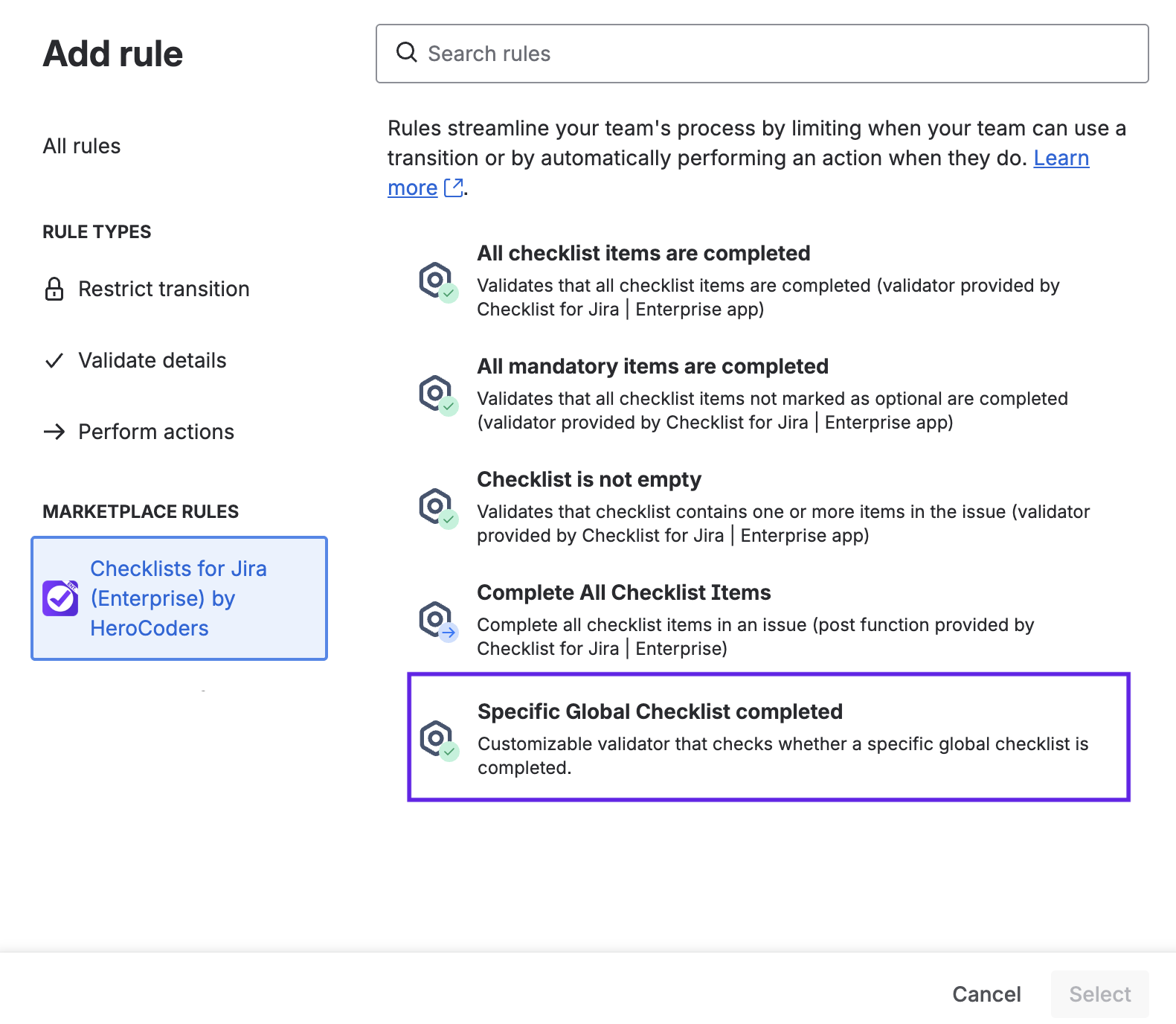
For a checklist to be effective, you need to ensure it can be bypassed. Checklists for Jira ships with built-in workflow validation rules, including a rule that validates for the completion of all items on a specified Global Checklist.
Checklist Templates & Local Checklists: When You Need More Flexibility
Checklists for Jira also empowers your teams with Checklist Templates and local checklists. These checklists can modified on the work item. Checklists can be manipulated by Jira automation, the Jira API or workflow rules, offering multiple opportunities to automate processes.
When a Checklist Template Is a Better Fit
Checklist templates give teams a reusable starting point. However, users can modify the template items. This makes templates ideal for situations where teams need structure, but not strict governance, such as:
Use a template when:
- Teams share a rough process, but may customize steps
- Items vary by space, customer, or environment
- The list is advisory rather than mandatory
When to Use a Local Checklist
Local checklists are created directly on the Jira work item. They’re lightweight and flexible.
They’re great for one-off tasks, ad hoc work, and item-specific details.
Use a local checklist when:
- You need to break down the specific steps that need to be done on the work item
- The steps are not repeatable across other work items, spaces or teams
- The work requires personal reminders or coordination details
Combining Global and Local Checklists
You can include multiple checklists on a given work item. For example, Jira work item in a Software development space might have:
- A Global Checklist for the Definition of Done
- A Checklist templates for the Acceptance Criteria (which can be modified to fit the specific story)
- Local checklists for breaking down the work to be done on the story


