Accurate time tracking is essential for billing clients, forecasting resources, and understanding operational costs. But when every project in Jira has different reporting needs, managing time-tracking fields has traditionally been a challenge.
Previously, worklog attributes in Clockwork Pro applied globally across all projects. Adding a field like Billable Status or Invoice Reference for a client project meant internal software engineering or HR teams saw it too.
To avoid cluttering unrelated workflows, teams often made fields optional or told users to simply "ignore" them - leading to missing billing details, inconsistent data, and hours wasted cleaning up reports at month-end.
Now, project-level worklog attributes are available in Clockwork Pro.
What's New?
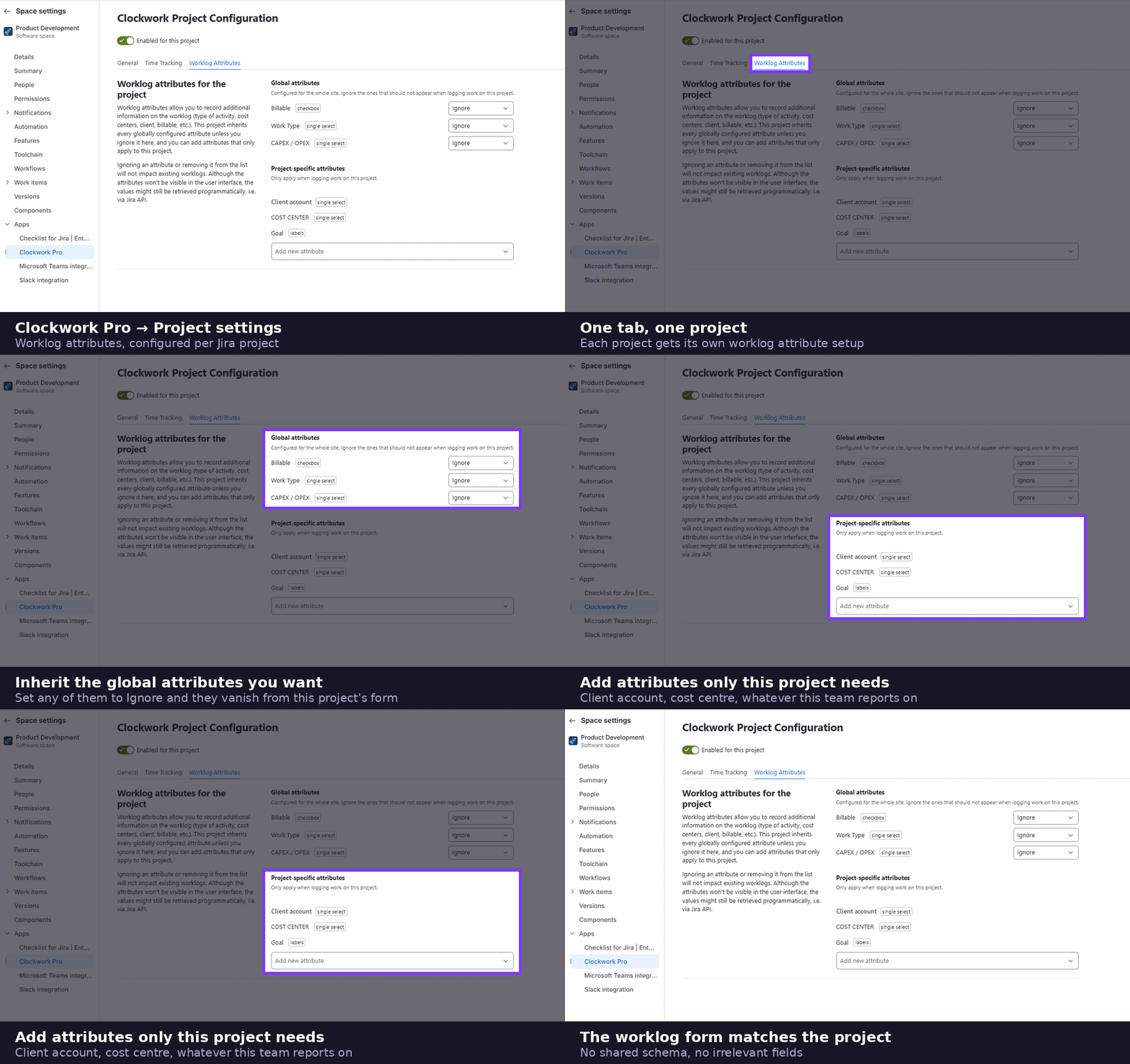
With project-specific attributes, you can now tailor worklog forms to match the exact requirements of each individual Jira project.
Instead of maintaining a one-size-fits-all global schema, project leads and Clockwork admins can:
- Assign dedicated fields per project: Show only what's relevant to the team working in that space.
- Hide unnecessary global attributes: Keep logging forms lean and distraction-free.
- Set field-level requirements per project: Make attributes mandatory where they matter without blocking workflows elsewhere.
Why Teams Love It
1. Faster, Friction-Free Time Logging
Team members only see fields that directly relate to their work. Without irrelevant dropdowns or confusing prompts, logging hours takes seconds.
2. High-Integrity Data Collection
Set mandatory fields with confidence. You can enforce required fields like Account Code or Overtime Category on client-facing work without forcing internal teams to fill out dummy data.
3. Reliable Reporting and Invoicing
Capture the right metadata at the point of entry. Eliminating incomplete logs means finance, operations, and project managers get accurate reports instantly - without manual audits or spreadsheets.
Tailored for Every Type of Project
Client Services & Agency
Example attributes: Billable vs. Non-Billable, Client Account, Overtime Rate.
Configuration: Required for all logged hours to streamline invoicing.
Internal Product & Engineering
Example attributes: CAPEX vs. OPEX, R&D Tax Credit Eligibility, Cost Center.
Configuration: Focused strictly on internal financial tracking; billing fields hidden.
Operations & Support
Example attributes: Shift / On-Call, Location / Travel Time.
Configuration: Simple, low-touch entry with only essential operational fields.
How It Works in Clockwork Pro
Configuring project-level attributes is simple, lightweight, and requires zero Jira admin escalation:
- Select a Project: Navigate to your project settings in Clockwork Pro.
- Choose Your Attributes: Add new custom attributes specific to that project, or inherit and hide select global attributes.
- Define Requirements: Set field types (checkbox, single select drop down or label) and toggle fields as Required or Optional.
- Save & Deploy: The custom worklog form is immediately available to anyone logging time in that project.
See Clockwork Pro in Action
This full product demo walks through time tracking, timesheets, reporting and approvals in Jira. Worklog attributes appear on the Log Work form early in the walkthrough.
Get Started Today
Project-Level Worklog Attributes are now live for all Clockwork Pro users.
Take control of your time-tracking workflows and give your teams the clarity they need to log hours accurately.
Frequently Asked Questions
What are project-level worklog attributes in Clockwork Pro?
Project-level worklog attributes are custom time-tracking fields that apply to a single Jira project instead of to every project at once. In Clockwork Pro, you can attach attributes such as Billable Status, Client Account, or Cost Center to one project, and anyone logging time in that project sees only those fields on the worklog form.
Do project-level attributes replace my existing global worklog attributes?
No. Global worklog attributes still exist and are inherited by projects by default. Project-level configuration sits on top of them: within a given Jira project you keep the global attributes that are relevant, hide the ones that are not, and add extra attributes that only that project needs.
Do I need Jira admin permissions to configure worklog attributes for a project?
No. Project-level worklog attributes are configured in Clockwork Pro's project settings, so project leads and Clockwork admins can set them up without escalating to a Jira administrator or changing anything at the Jira instance level.
Can the same worklog attribute be required in one project and optional in another?
Yes. Field requirements in Clockwork Pro are set per project, so you can make an attribute such as Account Code mandatory on client-facing work while leaving it optional or hidden for internal teams. This lets you enforce data quality where it matters without blocking time logging elsewhere.
Are project-level worklog attributes available in Clockwork for Jira (Lite)?
No. Project-level worklog attributes are a Clockwork Pro feature and are available to all Clockwork Pro users. Clockwork Lite covers automated time tracking and core timesheets, while per-project attribute configuration and the detailed billing and cost reporting it feeds require Clockwork Pro.