Choose Clockwork for Jira (Lite) if your team needs to record hours in Jira and read them back on a timesheet. Choose Clockwork for Jira (Pro) if those hours also have to become invoices, approvals, budgets or reports. Neither edition caps your timers, both carry the same security certifications, and both are free on Jira instances of 10 users or fewer.
That is the decision in four sentences. The rest of this post is the detail behind it: what the two editions share, exactly what Pro adds, and what happens if you pick wrong.
What Clockwork Lite and Clockwork Pro both do
The tracking engine is the same in both editions. Whichever one you install, your team gets:
- Automatic and manual timers. Automatic timers start and stop from work item status transitions; manual timers start and stop on demand.
- Manually created worklogs, added and edited after the fact.
- The My Work view, with a timesheet and a calendar.
- Timesheets with filters and breakdowns.
- Worklog export.
- JQL search for work items by user and timeframe, through Jira's worklogAuthor expression.
- Per-project enablement - turn Clockwork on globally or only in the projects that need it.
- Identical security and support: Bug Bounty Program, Cloud Security Program, Cloud Fortified, SOC2 Type II compliance and five-star support.
That last row is worth pausing on. Clockwork Lite is not a security-reduced edition. The certifications a procurement team asks about are the same on both.
The 300-timer cap is gone
Clockwork Lite used to cap timers at 300 per month. Every team member can now start as many timers as they need, every month, with no interruptions.
Automatic timers fired by status transitions, reassignments and quick start/stops no longer eat into a limited budget either. Third-party comparison articles written before May 2026 still cite the 300-timer cap - it no longer applies, so check the date on anything you are reading.
What Clockwork Pro adds
Everything Pro adds on top of Lite falls into one of three jobs: turning hours into money, governing how hours get logged, and analysing them afterwards.
1. Money
This is the cleanest line between the two editions. Clockwork Lite has no financial features at all. Clockwork Pro adds:
- Cost and rate tracking - an internal hourly cost and a customer-facing billing rate per user, so logged hours resolve into spend and revenue. Access to these figures sits behind a Clockwork Budgeting Access permission, and each user currently carries one cost and one rate rather than rates that vary by period or by space.
- Billable hours tracking, usually via a worklog attribute such as Billable or Client Account.
- Billing periods - admin-defined windows after which users can no longer add, edit or remove worklogs for that timeframe, with manual lock and unlock, a scheduled auto-close, and named exemptions for people who still need to edit.
2. Governance
Lite lets people log time. Pro lets you set rules about how they log it:
- Timesheet approvals - weekly or monthly approval periods, submission from My Work, and an approver who approves or rejects the week, with a comment if one is needed.
- Required worklog descriptions, and restrictions on logging time in the past or the future.
- A workflow validator that requires work to have been logged in a specific status before a work item can be transitioned.
- Working hours at global, project and user level - Lite is global only - plus holiday schemes.
- Compare worklogs to working hours, which highlights who is over or under target, and email notifications to people who have not logged enough hours.
- Clockwork permissions management, covering who can reach timesheets, reports, teams, billing periods and timers, who can log time on someone else's behalf, and who can edit working hours.
3. Analysis
Lite answers “how many hours”. Pro answers “hours on what, by whom, against which estimate, at what cost”:
- Filters and breakdowns by custom field, worklog attribute, team, outliers, internal activities and advanced work item hierarchies. Lite has none of these.
- Custom worklog attributes - up to ten purpose-built time-tracking fields (checkbox, single-select dropdown or label), configurable per project.
- Saved reports, so a timesheet configuration you rebuild every Monday becomes a link instead.
- Full export - any timesheet to Excel, not just worklogs.
- Dashboard gadgets - a Worklogs Summary gadget and a gadget that puts a saved report on a Jira dashboard.
- The Clockwork Rovo Agent, which answers questions about cost, profitability and time allocation in plain language. It needs a Jira plan that includes Rovo access, and it appears in the Rovo agent list as Clockwork Timesheet. As with any AI output, the documentation asks you to verify its answers before acting on anything critical.
And the day-to-day differences
A few Pro features are not about money, rules or reporting - they just remove friction:
- Log work for others, for scrum masters and space leads filling gaps on behalf of the team.
- Internal activities - a place to log stand-ups, meetings, admin and leave without polluting project time.
- The full calendar: copy-paste and repeating worklogs, Google or Outlook Calendar integration, and drag and drop of recent work items. Lite has the calendar view but none of these.
- Time on Jira board cards and time spent shown in the JSM portal.
- The full Clockwork API, and JQL extensions for running timers and accumulated hours. Lite reaches worklogs through the Jira API only.
The side-by-side
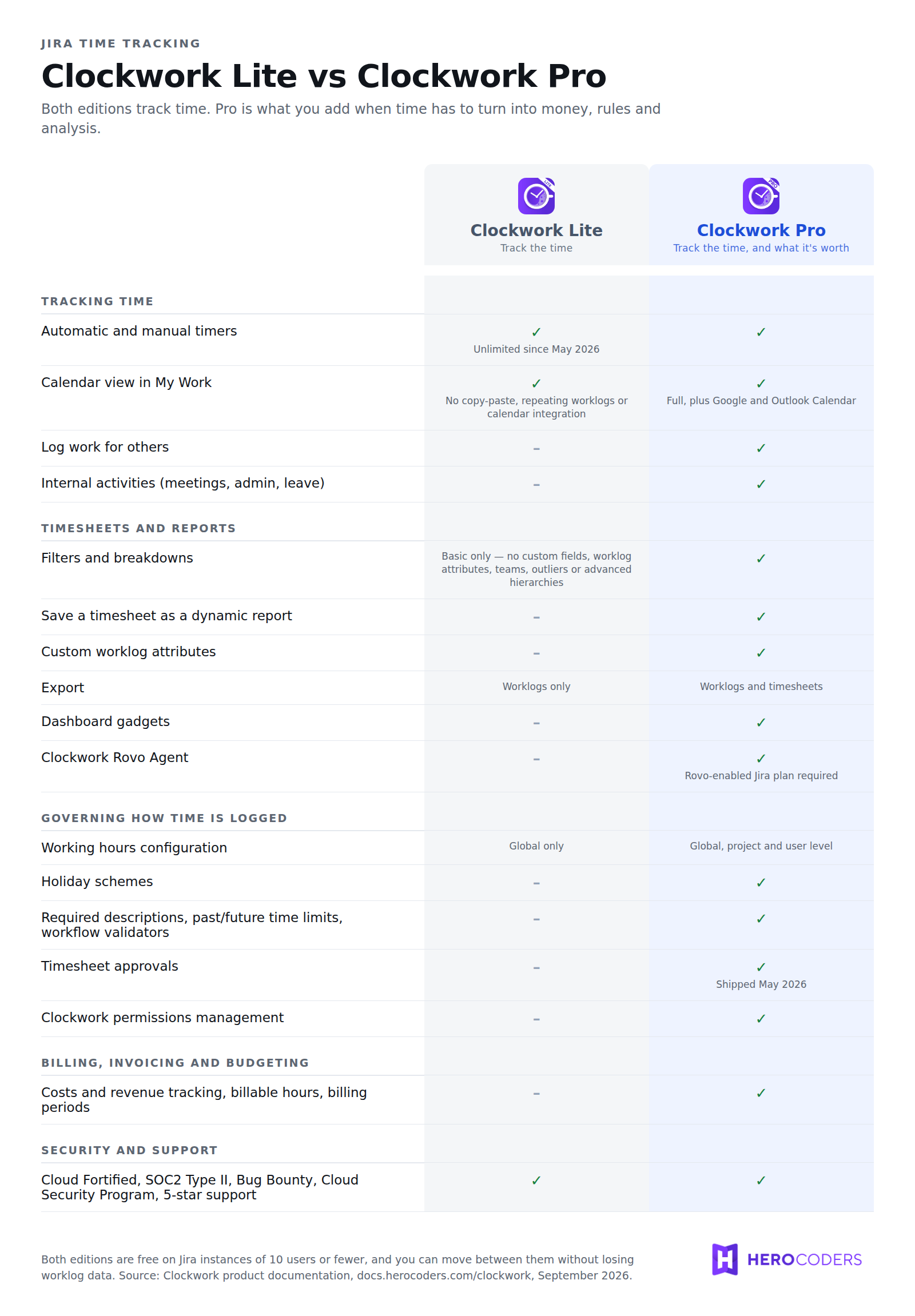
The full feature matrix, as the product documentation states it:
Choose Clockwork Lite if
- You need hours in Jira, and a timesheet you can read and export.
- Nobody bills those hours to a client, and nobody signs them off.
- One set of working hours covers the whole company.
- Your reporting need is “how much time went on this project”, not “was this project profitable”.
Choose Clockwork Pro if
- You invoice clients, or you need to know what a project actually cost.
- Someone has to approve timesheets before they are treated as final.
- Teams sit in different countries, on different schedules, with different holidays.
- You need reports that slice by team, attribute or custom field - or a gadget on a Jira dashboard.
- You need to enforce data quality: required descriptions, mandatory attributes, no transition without time logged in the right status.
If you are a services business of any size, the money features alone usually decide it. Internal teams benefit too: cost reports show what a project or initiative actually cost, which feeds budgeting and planning. If all you need is to see where effort went, Lite frequently does the whole job.
Picking wrong is cheap - but not free
Your worklogs carry over either way, however often you switch.
Pro-only settings don't: worklog attributes, saved reports, billing periods, holiday schemes, permissions, and costs and rates. Downgrading means setting them up again if you return to Pro.
To switch, install the other edition from Manage Jira apps at admin.atlassian.com, then uninstall yours.
With 10 users or fewer, both editions are free: small teams can start on Pro.
Frequently asked questions
What is the difference between Clockwork Lite and Clockwork Pro?
Clockwork for Jira (Lite) and Clockwork for Jira (Pro) share the same time-tracking engine: automatic timers, manual timers, manual worklogs, the My Work view, basic timesheets and worklog export. Clockwork Pro adds financial tracking (costs, rates, billable hours, billing periods), governance (timesheet approvals, required descriptions, workflow validators, permissions, holiday schemes) and advanced analysis (saved reports, worklog attributes, dashboard gadgets, the Clockwork Rovo Agent).
Does Clockwork Lite have timesheet approvals?
No. Timesheet approvals are a Clockwork Pro feature. They cover weekly or monthly approval periods, submission from My Work, and an approver who approves or rejects the period with a comment. Clockwork Lite has no approval workflow.
Can I upgrade from Clockwork Lite to Clockwork Pro without losing data?
Yes. Worklog data survives a move in either direction and remains available on the timesheet after the switch. Configuration is different: only settings that exist in both editions are preserved, so Pro-only setup such as worklog attributes, saved reports, billing periods, holiday schemes, permissions and cost and rate data does not carry over to Lite. To switch, open admin.atlassian.com, go to Manage Jira apps and then Explore apps, install the edition you want, and uninstall the other one.
Is Clockwork Lite less secure than Clockwork Pro?
No. Both editions carry the same credentials: the Bug Bounty Program, the Cloud Security Program, Cloud Fortified status and SOC2 Type II compliance, with the same five-star support. Security and compliance do not vary by edition.
Are Clockwork Lite and Clockwork Pro free for small teams?
Both Clockwork Pro and Clockwork Lite are free of charge on Jira instances with 10 or fewer users. Atlassian will still display a trial for the first 30 days, because that is how the Marketplace presents paid apps, and you may see billing prompts even though you qualify. For larger instances, see the current per-user pricing on each app's Atlassian Marketplace listing.